The service (behavioral endpoint) description provides a representation of the endpoint projection for a role or participant within a Choreography Description. Whether the projection is for a role or participant depends upon the type of projection that is performed. This will be discussed in more detail later in the document.
The service endpoint model can be used purely as an endpoint projection description, or it can be used to constrain the behavior of an endpoint that is being monitored, or used as the template upon which an executable endpoint is built. These different uses will be elaborated further in the document.
The model associated with the Service Endpoint Description is in the package org.pi4soa.service.behavior.
The service execution and monitoring architectures, shown in Figure 1 and 2 (respectively), have many common components. These will be outlined in this section.
The session component represents the state information associated with a particular instance of a service description. This state information includes the information associated with the service description logic (i.e. variables), as well as information related to the current position within the service description.
The service repository contains the Service Descriptions that are available for use by the execution or monitoring environment.
The Service Tracker is the component that is used for logging information associated with the execution or monitoring of a service description instance.
The session manager is responsible for storing information regarding the current state of a service description instance (i.e. Session), to enable it to be restored at a later date. This may be used to recover current sessions after a failure, or to suspend a long running session and retrieve it in the future when a suitable event occurs that requires it to be resumed.
The identity manager is responsible for generating unique identities that can be used by a choreography session instance.
The following diagram represents the architecture for the pi4soa runtime execution environment.
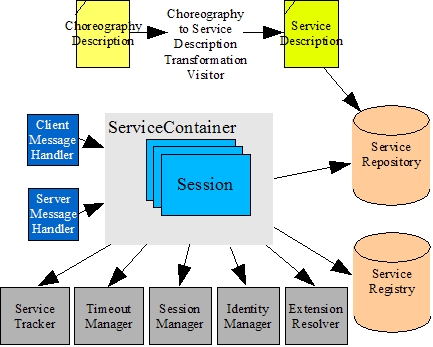
The Service Container is the component used to provide runtime execution of a service description.
The Message Handler is the component that is responsible for interfacing between the service container and the message source or destination. This can be implemented either by an embedding application, or interface with a transport technology for distributing messages to remove clients/services.
The message handler component can be used to either provide the client or server role for a service container.
The Service Registry provides a lookup mechanism to enable an executing service, within the service container, to obtain an endpoint reference to another service that it wishes to interact with.
The timeout manager is responsible for maintaining a list of timers, associated with service description instances, and causing a timeout if any of the timers expire.
The Extension Resolver is responsible for providing the implementation of an extension that is associated with a particular activity in a service description. The extension provides the custom code to execute any non-observable aspects of a choreography.
Extensions may be provided for send and receive activities where the variable has not be specified. They can also be provided for silent action activities, or non-observable conditions. Non-observable conditions may arise due to the absence of an expression (whether completely or just at a participant's projection), or if a choice has an element that does not have an explicit conditional activity.
The following diagram represents the architecture for the pi4soa runtime monitoring environment.
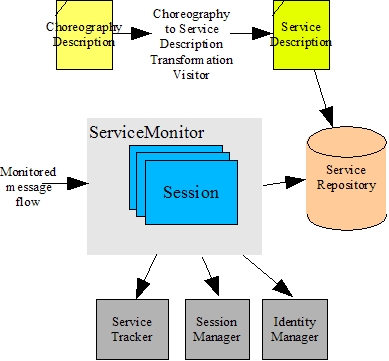
The Service Monitor is the component responsible for managing the monitoring of one or more service descriptions.
The service monitor shares may of the same components as the service container environment. However, rather than executing the service descriptions, it simply observes messages (intercepted from an appropriate transport mechanism) and compares them against the expected behavior.
This section describes the steps required to obtain an endpoint projection associated with a Choreography Description.
When projecting a choreography description, it is possible to project based on a role or a participant. If the participant is used, then the projection will represent a combination of all of the roles that are associated with the participant. This section describes how to obtain information about what participants and roles are available within a choreography description.
The Choreography Description model is defined in the org.pi4soa.cdl package. The top level component in the model is the Package interface (equivalent to the WS-CDL element).
All static type related information in the choreography description is contained within a TypeDefinition component that is associated with the package. This can be retrieved using the getTypeDefinition() method on the package.
The type definition component maintains a list of the participants and roles that are associated with the choreography description. These can be accessed using the getParticipantTypes() and getRoleTypes() methods.
The org.pi4soa.cdl.ParticipantType interface has a relationship to the roles (or more specifically role types) that it is associated with, which can be accessed using the getRoleTypes() method on that interface.
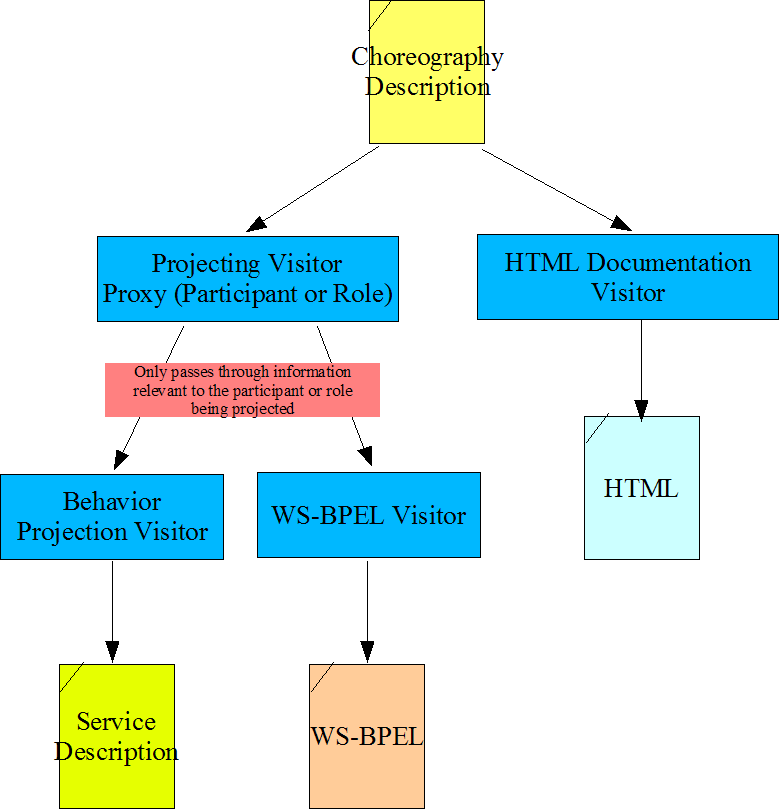
The projection mechanism uses the visitor pattern to traverse the Choreography Description.
The projection mechanism is actually built into a visitor 'proxy'. This enables code to be written, that wishes to operate on the projection of the Choreography Description (as opposed to the description directly), that also uses the visitor pattern.
The projection mechanism therefore sits between the actual visitor, and the model, adjusting the information that is visited so that it is presented to the real visitor in the appropriate way. These adjustments may relate to hiding some information that is not relevant to the role or participant being projected, to completely hiding a subtree from being visited.
Using this approach means that the same visitor code could be applied directly to the model, or to either the role or participant type projection, without having to change anything within the visitor.
The nature of the visitor will vary depending on the task being performed. In the following section we illustrate how the projection mechanism is used to produce a Service Endpoint Description. However, the visitor could be used to produce documentation, or project to a different endpoint language (e.g. WS-BPEL).
The following diagram represents the structure of the visitor mechanism used to project choreography description.
As mentioned in the previous section, the projection mechanism makes use of the visitor pattern, to modify the visited information in such a way to present it relative to the participant type or role type of interest. However, the actual components projected are the same types.
Therefore, in some situations, it is necessary to modify the information that is visited to provide the destination visitor with a clue as to how they should interpret the visited information. This section lists the details of how these clues should be interpreted, when building your own target projection visitors.
-
org.pi4soa.cdl.Interaction
When a projected visitor is passed an Interaction component, this will usually reflect information relevant to both parties involved in the interaction. However, from a projection perspective, we are only interested in the information relevant to the role/participant being projected.
Therefore, the projecting proxy hides the information associated with the other party, only making available information required by the projected party. This includes,
- the timeout record details only for the relevant role type (from or to), the other roles timeout record details will return an empty list
- only the record details that are relevant to the projected role/participant
-
org.pi4soa.cdl.ExchangeDetails
As with the interaction type, the exchange details provide information concerning both parties in the interaction. Therefore the projecting visitor proxy hides information not relevant to the projected role or participant type. This includes,
- the send and receive variable information – only one of the variables will be relevant, depending on whether the projected role is the sending or receiving party. The other variable will return null. As the variable field is optional, and therefore may be null in the real choreography description, this is catered for by returning an empty variable for the projected role/participant. This can be determined by the fact that the variable's name is null.
- the send/receive variable part information – only the projected role/participant will return information, otherwise null – however this field is also optional, so both the sending and receiving variable part information may be null.
- the record details for the sending or receiving role will be returned, depending on the role assumed by the projected role/participant type – the other record details list will be empty
- cause exception fields – only the projected role will return the real value, which may be null anyway as the field is optional
The org.pi4soa.service.behavior.projection.BehaviorProjection class provides a static convenience method for performing the projection of a Choreography Description based on a Participant Type, called projectServiceDescription. There are two variations of this method, one that takes the CDL file path and participant type name, and the other that takes the loaded CDL package, participant type object and an optional artifact manager. The artifact manager is provided to enable associated artifacts to be located (e.g. WSDL files).
For example,
org.pi4soa.cdl.ParticipantType partType=....;
org.pi4soa.cdl.Package cdlpack=....;
org.pi4soa.common.resource.ArtifactManager artifacts=.....;

try {
    org.pi4soa.service.behavior.ServiceDescription sdesc=
             BehaviorProjection.projectServiceDescription(cdlpack, partType, artifacts);
} catch(org.pi4soa.service.ServiceException se) {
    // Failed to project service endpoint description
    .....
}
Where the artifacts exist within the file system, as structured in the Eclipse pi4soa designer (i.e. in sub-folders beneath the folder containing the Choreography Description file), then the org.pi4soa.common.resource.FileSystemArtifactManager implementation can be used. This class takes the root folder as an argument to its constructor.
String cdlFolder=....;
org.pi4soa.common.resource.ArtifactManager artifacts=
        new org.pi4soa.common.resource.FileSystemArtifactManager(cdlFolder);
This implementation of the artifact manager expects to find sub-folders in the specified root folder named after the CDL package and artifact type. For example, if a Choreography Description has a CDL Package component with name 'simplerfq', and the artifact type is 'wsdl', then it will expect to locate the artifacts in a sub-folder called "simplerfq_wsdl".
A simple version of the projection method also exists, which takes the CDL file path and the name of the participant. For example,
String partTypeName=....;
String cdlFilePath=....;

try {
    org.pi4soa.service.behavior.ServiceDescription sdesc=
            BehaviorProjection.projectServiceDescription(cdlFilePath, partTypeName);
} catch(org.pi4soa.service.ServiceException se) {
    // Failed to project service endpoint description
    .....
}
In addition to being able to generate the skeleton behavior for a service endpoint, in a variety of executable languages, the choreography description can also be used to generate interface descriptions for the services involved in a choreography.
Once an interface exists for a service involved in a choreography, whether generated from the choreography or pre-existing, it is possible to use the definition of the service interface to constrain subsequent interactions with that service to only the operations defined on the interface – this is called interface introspection.
This section describes how to generate an interface description from a choreography description, and then how to write an interface introspector for use in validating a choreography description against an existing service interface description.
The first step in generating interfaces for a choreography description is to obtain a reference to the Interface Deriver. This component is responsible for returning a description of the interfaces from a choreography description and can be interrogated using two approaches.
The Interface Deriver implements the interface org.pi4soa.cdl.interfaces.InterfaceDeriver, and can be obtained from a static factory class, e.g.
org.pi4soa.cdl.interfaces.InterfaceDeriver deriver=
            org.pi4soa.cdl.interfaces.InterfaceFactory.getInterfaceDeriver();
The first approach for accessing interface information is to use a visitor pattern. The visitor interface to be implemented is org.pi4soa.cdl.interfaces.InterfaceVisitor. This visitor has methods related to the role types, interfaces, operations and message definitions. The visitor is initiated using a method on the deriver, e.g.
org.pi4soa.cdl.interfaces.InterfaceVisitor visitor=.....;
org.pi4soa.cdl.Package cdlpack=....;

deriver.visitInterfaces(cdlpack, visitor);
The other approach is to directly traverse an object model representing role types, interfaces, operations and messages derived from the choreography description.
org.pi4soa.cdl.interfaces.RoleTypeDefinition rtdefs=null; rtdefs = deriver.getRoleTypeDefinitions(cdlpack);
This can be used to obtain all of the role type definitions for a choreography description. Alternatively, if a particular role type definition is required, then the 'getRoleTypeDefinition()' method can be used which takes the choreography description and role type.
Once a role type definition has been obtained, it can be used to traverse the associated interface definitions. See the javadocs for more information on these classes.
Generating an interface description can be invoked under user control from an action presented in the Eclipse user interface. The pi4soa tools do not currently provide any other general infrastructure support for plugging in these generation capabilities. They are implemented as part of separate plugins that are responsible for registering their own Eclipse menu actions, creating the relevant artifacts, handling any merging issues, and also performing any necessary validation prior to allowing the generation to occur.
One general principle that should be followed is that no generation should occur if there are errors outstanding on the associated choreography description.
Interface introspection is the mechanism for analysing an interface description, in a known format, to build a representation of that interface in a generic representation that can be used by other pi4soa tools. This enables the other pi4soa tools to remain independent of the interface format.
An interface introspector implements the interface org.pi4soa.cdl.interfaces.InterfaceIntrospector.
This interface has the following methods:
- getModuleId – this will usually be the same as the plugin id containing the introspector implementation
- getModuleName – returns the name of the module associated with the introspector
- getInterfaceDefinition – this method will return the interface definition, if located, associated with a choreography description and fully qualified interface name (i.e. namespace and local name). The method is also provided with a folder path in which the relevant artifacts will be located.
To register an introspector implementation, to enable other tools to make use of it, the InterfaceFactory provides a static method, e.g.
org.pi4soa.cdl.interfaces.InterfaceIntrospector introspector=....;

org.pi4soa.cdl.interfaces.InterfaceFactory.register(introspector);
The org.pi4soa.cdl.interfaces.InterfaceFactory also provides static methods for unregistering an introspector, returning the list of registered introspectors, and obtaining an introspector for a particular module id.
Any registered introspectors will be used as part of the standard choreography description validation, if appropriate interface definition files have been placed in the appropriate sub-folder for the choreography description and interface format. These validation rules will interate through the available introspectors until an interface definition is found for a particular namespace and local name.
This section discusses the use of the components associated with the Service Endpoint Monitor.
A Service Endpoint Monitor is the mechanism used to enable a transport mechanism to be observed to ensure that the message flow conforms to a Service Endpoint description configured within the monitor.
The monitor provides a defined interface to enable messages that are being sent or received to be recorded. How the monitor is integrated with the message flow (transport mechanism) is out of the scope of this document. This will vary depending upon the technology being used.
Before describing how service monitors are created, we will first discuss the information required when instantiating a service monitor, namely the monitor configuration.
When retrieving a service monitor, the application needs to provide some configuration information. This monior configuration is provided by an implementation of the org.pi4soa.service.monitor.MonitorConfiguration interface.
There is a default implementation of this interface in the same package, called DefaultMonitorConfiguration, which contains default values for each of its properties. There is also a XMLMonitorConfiguration class that initializes itself with appropriate implementations of the relevant components (listed below) based on properties defined in a file within the classpath called pi4soa.xml.
This configuration information is used to identify the following information:
- the service repository – if not defined then a default (transient) implementation will be used
- the service tracker implementation – if not set, then the logger service tracker implementation is used
- the session manager implementation – by default a transient implementation will be used
- the identity manager implementation – by default, a local identity generator will be used, which assumes identities only have to be unique within the scope and lifetime of the JVM
- the 'reportUnknownMessages' property – by default indicates that unknown messages should also be reported. If set to false, then any messages that are not related to the service type interfaces of the registered service descriptions will simply be ignored.
The default implementation of the ServiceRepository is initially empty, until the embedding application obtains a reference to it (either from the configuration or from the service monitor), and adds the required service descriptions.
The org.pi4soa.service.monitor.ServiceMonitorFactory is responsible for creating service monitors. The factory can be used to create service monitors with default configurations, or with a supplied configuration.
An example of obtaining a org.pi4soa.service.monitor.ServiceMonitor, from the factory is:
MonitorConfiguration config=....;
org.pi4soa.service.monitor.ServiceMonitor monitor=
            ServiceMonitorFactory.getServiceMonitor(config);
To register a service endpoint description with the org.pi4soa.service.monitor.ServiceMonitor, to enable messages to be monitored against the description, the following should be performed:
org.pi4soa.service.behavior.ServiceDescription sdesc=....;

org.pi4soa.service.monitor.ServiceMonitor monitor=
            ServiceMonitorFactory.getServiceMonitor(config);

monitor.getServiceRepository().addServiceDescription(sdesc);
When monitoring of the service description is no longer required, then the 'removeServiceDescription' method on the org.pi4soa.service.repository.ServiceRepository component can be called.
To enable message exchanges to be reported to the Service Monitor, the monitor's interface provides the means to create a message that encapsulates the relevant details. Once created, this message can then be dispatched to the monitor for comparison against the registered service descriptions and active sessions.
There are two methods for creating the message, one for requests and one for responses. Both methods take the same set of arguments, but represent different directions in the conversation between two participants.
The arguments to the 'createRequest' and 'createResponse' methods are:
String opName The operation name. String faultName The optional fault name – in general this will only relate to the response, but WSDL2.0 supports faults in the request message aswell. String serviceType The service type represents the fully qualified type of the endpoint that represents the service within the conversation. EndpointReference serviceEndpoint The endpoint reference represents a specific location for the service instance. This information is not always available, especially within the service implementation, and is therefore optional from the monitoring perspective. However it can be useful from an audit trail perspective. java.io.Serializable value The value associated with the message. Identity sessionId The optional session id This field is only specified if explicit identifies are being used. Otherwise the identity details will be derived from the business Identity channelIdentity The optional channel id. This field is only specified if explicit identifies are being used. Otherwise the identity details will be derived from the business message.To dispatch the message to the monitor, there are two methods that indicate whether the message was being sent or received. For example, when a message is being sent:
org.pi4soa.service.Message mesg=monitor.createRequest("helloWorld",
               null, "{http://www.pi4soa.org/}HelloWorldService", endpointRef,
               value, null, null);

monitor.messageSent(mesg);
or when a message is being received:
org.pi4soa.service.Message mesg=monitor.createResponse("helloWorld",
               null, "{http://www.pi4soa.org/}HelloWorldService", endpointRef,
               value, null, null);

monitor.messageReceived(mesg);
Note
The format of the service type is a QName, which is represented as a namespace enclosed in braces followed by the local part, e.g. {namespace}localpart.
There are two ways in which unexpected messages can be detected.
The first approach is to catch the relevant org.pi4soa.service.UnexpectedMessageException or org.pi4soa.service.OutOfSequenceMessageException exception which is thrown when invoking the 'messageSent' or 'messageReceived' method.
If a message is processed that does not relate to any service descriptions that have been registered, then the monitor will (by default) throw an UnexpectedMessageException exception. However, it is possible to configure the monitor to ignore these messages, so that only messages associated with a service type related to a service description being monitored will be reported. See the 'reportUnknownMessages' property on the org.pi4soa.service.monitor.MonitorConfiguration.
The other approach is to provide an alternative implementation for the org.pi4soa.service.tracker.ServiceTracker component. The org.pi4soa.service.tracker.ServiceTracker is informed when an unexpected message occurs. This also includes out of sequence messages, which from the tracker's perspective are also unexpected.
This section discusses the use of the components associated with the Service Endpoint execution.
A Service Container is the environment in which service endpoint instances are executed. An embedding application only needs to access a service container for three reasons,
- to configure the container with the relevant message handlers (i.e. interfaces to the message transport)
- to add service descriptions to the service repository associated with the container
- to initiate a new instance of a service endpoint
Service endpoints may be used within a simple application, to enable the execution of a single endpoint instance on behalf of that application, or in a server environment, where the container is managing many service endpoint instances (for one or more service descriptions).
Before describing how service containers are created, we will first discuss the information required when instantiating a service container, namely the container configuration.
When retrieving a service container, the application needs to provide some configuration information. This container configuration is provided by an implementation of the org.pi4soa.service.container.ContainerConfiguration interface.
There is a default implementation of this interface in the same package, called DefaultContainerConfiguration , which contains default values for each of its properties. There is also a XMLContainerConfiguration class that initializes itself with appropriate implementations of the relevant components (listed below) based on properties defined in a file within the classpath (pi4soa.xml) if present. (NOTE: A property file is provided with the org.pi4soa.common plugin, which is used to configure actions performed within the Eclipse environment). See the section on XML Configuration for details of the structure of this property file.
This configuration information is used to identify the following information:
- the optional list of client and server message handlers (see later for information on how to register message handlers dynamically
- the service repository – if not defined then a default (transient) implementation will be used
- the service registry implementing either the org.pi4soa.service.ServiceRegistry or org.pi4soa.service.container.MutableServiceRegistry interfaces – if not defined then a default (transient) mutable service registry is used
- the timeout manager implementation
- the service tracker implementation – if not set, then the logger service tracker implementation is used
- the session manager implementation – by default a transient implementation will be used
- the identity manager implementation – by default, a local identity generator will be used, which assumes identities only have to be unique within the scope and lifetime of the JVM
- the extension resolver implementation – by default an implementation will be used that locates the extension classes, from a base Java package, based on the service description name, choreography name. extension activity name and extension type
- the list of endpoint references that the container will be associated with, that will be used to route messages to this container
An example of creating the configuration information is:
DefaultContainerConfiguration config=new DefaultContainerConfiguration();

DefaultEndpointReference ref=new DefaultEndpointReference("http://www.pi4soa.org/");

config.setEndpointReferences(new DefaultEndpointReference{ref});

// Statically configure the Axis message handler with the service container

config.setClientMessageHandlers(new MessageHandler{ new AxisClientMessageProvider() });
Generally the org.pi4soa.service.repository.ServiceRepository and org.pi4soa.service.registry.ServiceRegistry can remain the default values, unless an alternative implementation is required.
The default implementation org.pi4soa.service.registry.DefaultMutableServiceRegistry of the Service Registry can read discovery details from a file within the classpath called "pi4soa_service_registry.properties". The contents of this file is a set of properties of the form "serviceType = URL". This default service registry also has a constructor that enables the application to specify the path of the property file that it wishes to use to initialize the registry.
The default implementation of the Service Repository is initially empty, until the embedding application obtains a reference to it (either from the configuration or from the service container), and adds the required service descriptions. There is an alternative implementation, org.pi4soa.service.repository.FileBaseServiceRepository, that is initialized from the file called 'pi4soa_service_repository.csv', which stores information in a two column comma separated format. The first column defines the path to the .cdl file, and the second column defines the participant of interest within that CDL model.
The org.pi4soa.service.container.ServiceContainerFactory is responsible for creating service containers within the embedding application.
An example of obtaining a Service Container from the factory is:
ContainerConfiguration config=....;

ServiceContainer container=ServiceContainerFactory.getServiceContainer(config);
The configuration is used to configure the ServiceContainer instance when it is initially retrieved. If the configuration is not specified, then a default service container will be returned.
The Message Handler is an interface used to enable the service endpoint to send requests to other service endpoints, and send responses or faults to service clients. It provides the means to integrate transport technologies into the service execution environment, although it can also be used by the application to handle message routing itself (internally) between different service containers.
The message handler interface is comprised of the following methods:
-
getName()
This method returns the name of the message handler.
-
setMessageDispatcher()
This method establishes the association between the message handler and the container, by providing a callback interface which is used for sending messages to the container
-
process()
This method is used by the container to send a message to the message handler, and subsequently to the communications mechanism that the handler represents. If the message handler is being used in the client role, then the messages processed will be requests. If used in the server role, then the messages will be responses and/or faults.
-
acknowledge()
This method is used to enable the container to acknowledge a message that has been received (and processed) via its message dispatcher.
-
supportsEndpointReference()
This method determines whether the message handler can be used to communicate with a service that is located using a supplied endpoint reference.
This section will describe how the message handlers are configured and used within the service container.
The first mechanism used to configure message handlers is to define them as part of the Service Container configuration (discussed previously).
The second mechanism used to configure message handlers is to create an instance of the relevant handler, configured appropriately, and then register it with the Service Container using the appropriate register method. The particular method will depend on whether the message handler is being used for the role of client or server handler.
The client message handlers are used to perform the role of a client accessing another service endpoint. The service message handlers are used to perform the role of a server, enabling other clients to interact with a service implemented using a service endpoint within the container.
When the message handler is registered with the Service Container, the container will set the Message Dispatcher on the message handler. The message dispatcher provides the mechanism for the handler to send inbound messages (requests, response or faults) to the service endpoint – discussed in a later section.
When a Service Endpoint execution needs to establish a new channel to another service endpoint, and therefore locate an appropriate client message handler to transport the requests to the relevant service endpoint, it may be necessary to select from multiple configured message handlers.
The Message Handler interface's supportsEndpointReference method can be used to determine whether a message handler is appropriate for use in communicating with the service identified by the endpoint reference. The first registered client message handler that indicates that it supports the endpoint reference will be used.
The service message handler that dispatches the incoming service request will automatically be selected to handle any response or fault message that results from processing the request.
When a service endpoint makes a request/response invocation to another service endpoint, it will be necessary to perform the invocation in an asynchronous manner. This is because the service endpoint execution operates in an asynchronous manner, and may potentially perform other activities in between sending a request and receiving a response (or fault). The state machine must therefore not block pending the receipt of the response.
To help develop message handlers that can perform synchronous request/response invocations in an asynchronous manner, there is a support class called org.pi4soa.service.container.MessageHandlerInvocation.
This class can be used to perform the service invocation in a separate thread, and then dispatch any response or fault message, into the service container, as appropriate.
An example of using this support class is in the Axis client message handler, which is derived from the org.pi4soa.service.container.AbstractMessageHandler to manage the message dispatcher (associated with the handler) and schedule the asynchronous invocation for execution. The relevant code fragment is shown below:
public void process(Message message, Channel channel, boolean responseExpected)
								throws ServiceException {

    EndpointReference endpoint=message.getServiceEndpoint();

    try {
        Service service=new Service();

        final Call call=(Call)service.createCall();
        call.setTargetEndpointAddress( new java.net.URL(endpoint.getEndpointURL()));
        call.setOperationName(message.getOperationName());
        call.addParameter( "value", XMLType.XSD_STRING, ParameterMode.IN );

        // Only schedule a task if we need to await a response

        if (responseExpected) { call.setReturnType( XMLType.XSD_STRING );

            schedule(new MessageHandlerInvocation(this, message, responseExpected) {
                public Object invoke(Message req) {
                     String ret=null;
                     try {
                         ret =(String)call.invoke( new Object{req.getValue()});
                     } catch(Exception e) {
                         logger.severe("Failed to invoke operation: "+e);
                     }

                     return(ret);
                 }
            });

        } else {
            call.invokeOneWay(new Object{message.getValue()});
        }
    } catch(Exception e) {
        logger.severe("Failed to create call to Axis service: "+e);
    }
}
When implementing a Message Handler, it is sometimes useful to be able to store information with the message flow, that can be used to correlate back to the technology specific transport session that the message handler represents. For example, if a message handler can represent more than one transport session, then we need to be able to associate the specific session on which a request was received, so that the response can be sent back on the same transport session.
One way to achieve this is to implement the following steps in the message handler:
-
Prior to dispatching the message, store the relevant information in the message properties
if (getMessageDispatcher() != null) {
    Message mesg=getMessageDispatcher().createRequest(opName,
                       null, serviceType, null, value);

    String sessionKey=getSessionKey(session);

    mesg.setProperty(AXIS_SESSION, sessionKey);

    ret = getMessageDispatcher().dispatch(mesg);
}
This example is taken from the Axis Server message handler, which is derived from the org.pi4soa.service.container.AbstractMessageHandler (which provides access to the Message Dispatcher). The properties associated with the message must be serializable. As the Axis session is not serializable, it is necessary to obtain an indirect reference to that session, which is serializable, which can then be resolved back to the session at a later time.
-
In the acknowledgement of the request, transfer the stored details from the message into the supplied channel
public void acknowledge(Message message, Channel channel) throws ServiceException {
    channel.setProperty(AXIS_SESSION, message.getProperty(AXIS_SESSION));
}
-
When the response or fault is processed by the handler, extract the information from the channel, and use to send the message
String sessionKey=(String)channel.getProperty(AXIS_SESSION);

org.apache.axis.session.Session session=resolveSession(sessionKey);
This fragment is from the 'process' method on the Axis server message handler. Once the session has been resolved, the message can be sent back to the client via the returned Axis session.
The Message Dispatcher interface represents the interface used by a client or service message handler to forward messages, from a technology specific transport, into the Service Container.
The message dispatcher provides methods for creating a message object, and then dispatching it. The reason it is performed in two steps, is to enable the container to manage a pool of message objects (rather than having them instantiated for each inbound message), and to enable the message handler to associate other properties with the message before it is dispatched.
An example of this can be seen in the previous section on maintaining session information.
If a message handler is derived from the org.pi4soa.service.container.AbstractMessageHandler default implementation, then this class manages the message dispatcher on behalf of the message handler. When the handler is registered with the Service Container, the dispatcher will be initialized with the message handler.
When a Service Container is being used to represent a role or participant that is playing the service side of a collaboration, then it will automatically create new Service Endpoints when necessary, based on the inbound requests.
However, when a Service Container is being used to execute Service Endpoints that are performing the client side of a collaboration, then we need a mechanism for triggering the instantiation of a new Service Endpoint instance.
The Service Container interface provides a method for achieving this, called 'newServiceInstance'. This causes the new service endpoint, for the supplied service description, to be created and initiated. It is then the responsibility of the service endpoint execution to perform the necessary steps to either interact with other service endpoints, or perform an activity that will result in custom extension code being performed, which then integrates back into the application to determine what should occur next.
An example of performing this method is:
ServiceDescription sdesc=....;
ServiceContainer container=....;
Object instanceContext=....;
java.util.Map variables=....;

if (sdesc.canBeInitiated()) {
    try {
        container.newServiceInstance(sdesc, variables);
    } catch(ServiceException se) {
        logger.severe("Failed to create new service instance for '"+
                     sdesc.getName()+"/"+sdesc.getParticipant()+"': "+e);
    }
}
The newServiceInstance method takes the Service Description for the endpoint that needs to be instantiated, and an set of variables. The supplied variables will be used to initialize the top level choreography, which can then also be used by extensions to determine the session they are processing.
There is also another variation of the newServiceInstance method on the service container, which additional takes an optional session identity (org.pi4soa.service.Identity).
The session identity should only be explicitly supplied where the environment embedding the Service Container will consistently supply this session identity with each inbound message. Otherwise, the identity attributed to a session instance will be obtained from the contents of the messages exchanged between participants. Whichever identity approach is used, must be maintained for the life of the choreography session instance.
Another consideration, when determining whether to explicitly provide the session identity, is if a central monitoring utility will be used. In this case, each participant that is reporting monitoring information related to the session would need to use the same (set of) identity value(s).
If a client side application is only interested in initiating a single session, and then being informed when that session has completed, then the application must register a listener against the session manager used by the Service Container.
The session manager is responsible for managing the lifecycle of each session executed within the Service Container. An implementation of the org.pi4soa.service.session.SessionManagerListener can be registered against the session manager to be informed when a new session has started or completed. The listener is also informed when a session begins to process an event, and when it either successfully or unsuccessfully finishes processing the event.
For example,
ServiceContainer container=...;

MyExampleSessionMonitor mon=new MyExampleSessionMonitor();

container.getConfiguration().getSessionManager().addSessionManagerListener(mon);
container.newServiceInstance(sdesc, variables);

mon.waitForCompletion();
where the example class may be defined as:
public class MyExampleSessionMonitor implements SessionManagerListener {


    public MyExampleSessionMonitor() {

    }


    public void sessionStarted(Session session) {

        m_sessionCount++;

    }


    public void sessionProcessingStarted(Session session) {

    }


    public void sessionProcessingCompleted(Session session) {

    }


    public void sessionCompleted(Session session) {

        m_sessionCount--;


        if (m_sessionCount <= 0) {

            synchronized(this) {

                m_completed = true;

                this.notifyAll();

            }

        }

    }


    public void sessionProcessingFailed(Session session) {

    }


    public boolean isCompleted() {

        return(m_completed);

    }


    public void waitForCompletion() {

        synchronized(this) {

            try {

                 if (isCompleted() == false) {

                     this.wait();

                 }

            } catch(Exception e) {

                System.err.println("Error: "+e);

            }

        }

    }


    private boolean m_completed=false;

    private int m_sessionCount=0;

};
This example listener uses reference counting to work out when all initiated sessions have been completed and then notifies the waiting thread.