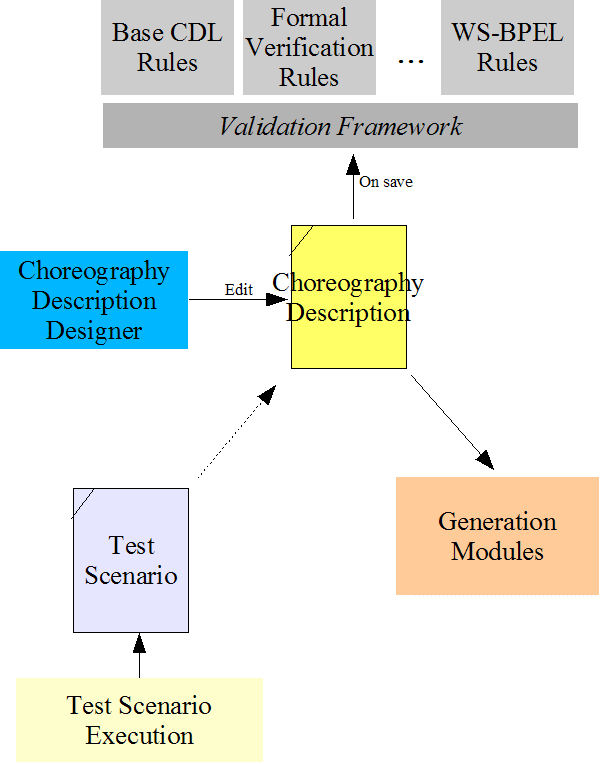
The Choreography Description represents the global perspective of the interactions between a collection of roles within collaborating participants. It is based on the syntax and semantics of the W3C Choreography Description Language (WS-CDL).
The pi4soa development tools enable a WS-CDL choreography description to be imported into, and exported from, the pi4soa designer. This tool will validate the choreography description and enable it to be used to project a range of endpoint descriptions (both syntactic, such as WSDL, and behavioral such as WS-BPEL).
The tool can also be used to project our own internal behavioral description, which can be used for the purposes of monitoring and executing the behavior of a service endpoint.
The model associated with the Choreography Description is in the package org.pi4soa.cdl.
The Choreography Description Designer is used to edit the Choreography Description document. This tool also provides the ability to import/export the description from the WS-CDL standard format.
The Validation Framework provides a mechanism to enable rules (grouped as rule sets) to be triggered to perform the validation of an object model (e.g. a Choreography Description).
Any information, warning or error messages that are detected during the execution of the validation rules will be displayed within the 'Problems' window in the Eclipse IDE.
The Scenario is a script that defines groups of message events that are associated with a Choreography Description. This scenario document represents a particular execution of a path defined within the choreography description. It can also be used to represent erronous paths, which should then result in 'unexpected message' exceptions when assessed against the choreography description.
Within the development environment, a number of generation modules may be defined that enable the selected Choreography Description to be described (and deployed) using a specific service endpoint technology.
Current technologies that are available include Java, WS-BPEL and WSDL. These tools are hooked into the pi4soa tool set using standard Eclipse plugin mechanisms.
This section describes the utilities available for loading and saving descriptions relevant to the pi4soa tools, and also importing and exporting the choreography description to WS-CDL standard format.
The Choreography Description model is stored in an XMI format. These files are directly edited using the pi4soa designer tools.
To load a Choreography Description, there is a utility class called org.pi4soa.cdl.CDLManager, which has two static load methods, one which takes the path name of a file, and the other that takes a java.io.InputStream. If the first method is used, then an absolute (fully qualified) or relative path name can be used, as well as a path name that is relative to the classpath.
For example,
String path="choreos/MyChoreo.cdm";
org.pi4soa.cdl.Package cdlpack=null;

try {
    cdlpack = org.pi4soa.cdl.CDLManager.load(path);
} catch(java.io.IOException ioe) {
    .....
}
If the endpoint projection is used to produce a Service Endpoint Description, then it may be necessary to persist the description – whether for storage purposes or to distribute the description across a network.
The following example code uses a utility class org.pi4soa.service.util.ServiceDescriptionManager, which has two static load methods, one that takes the file path, and the other that takes a java.io.InputStream. The class also has a static save method which saves a supplied Service Description to a supplied java.io.OutputStream. For example,
String path="services/MyServiceDescription.sdm";
org.pi4soa.service.behavior.ServiceDescription sdesc=null;

try {
    sdesc = org.pi4soa.service.util.ServiceDescriptionManager.load(path);
} catch(java.io.IOException ioe) {
    .....
}

.....

try {
    java.io.OutputStream os=....;
    org.pi4soa.service.util.ServiceDescriptionManager.save(sdesc, os);
} catch(java.io.IOException ioe) {
    .....
}
To import a WS-CDL document into a Choreography Description model, for use within the pi4soa tools, there is a utility class called org.pi4soa.cdl.CDLManager, which has two static importFromWSCDL methods, one which takes a java.io.InputStream (i.e. the textual representation of the WS-CDL XML document) and the other that takes a org.w3c.dom.Document.
The methods also take an implementation of the org.pi4soa.common.model.ModelListener interface, which is informed if any errors or warnings are generated during the import procedure.
For example,
java.io.InputStream is=....;
org.pi4soa.cdl.Package cdlpack=null;
org.pi4soa.common.model.ModelListener listener=null;

try {
    cdlpack = org.pi4soa.cdl.CDLManager.importFromWSCDL(is, listener);
} catch(org.pi4soa.common.xml.XMLException xe) {
    // Failed to parse the XML document
    .....
} catch(org.pi4soa.cdl.CDLExcepton cdle) {
    // Failed to import the WS-CDL
    .....
}
or with the DOM representation,
org.w3c.dom.Document doc=....;
org.pi4soa.cdl.Package cdlpack=null;
org.pi4soa.common.model.ModelListener listener=null;

try {
    cdlpack = org.pi4soa.cdl.CDLManager.importFromWSCDL(doc, listener);
} catch(org.pi4soa.cdl.CDLExcepton cdle) {
    // Failed to import the WS-CDL
    .....
}
To export a WS-CDL document from a Choreography Description model, used within the pi4soa tools, there is a utility class called org.pi4soa.cdl.CDLManager, which has a static exportToWSCDL method which returns org.w3c.dom.Document representation of the WS-CDL document.
The method takes an implementation of the org.pi4soa.common.model.ModelListener interface, which is informed if any errors or warnings are generated during the export procedure.
For example,
org.w3c.dom.Document doc=null;
org.pi4soa.cdl.Package cdlpack=....;
org.pi4soa.common.model.ModelListener listener=null;

try {
    doc = org.pi4soa.cdl.CDLManager.exportToWSCDL(cdlpack, listener);
} catch(org.pi4soa.cdl.CDLExcepton cdle) {
    // Failed to export the WS-CDL
    .....
}
The Validation Framework provides a common mechanism for the invocation of rules at the point where a choreography or service endpoint description has been modified and saved. The results from the validation are then presented in the 'Problems' window of the Eclipse IDE.
This section describes how to add validation rules into this framework.
A rule set is a collection of rules that will be triggered to process a Choreography or Service Endpoint Description when it has been saved following modification. The rule set interface (org.pi4soa.common.validation.ValidationRuleSet) is defined with the following methods:
-
getRuleSetId()
This method returns the id for the ruleset. If the ruleset is associated with a plugin, then the plugin's id should be used. This is because it will then be possible to enable/disable the ruleset based on a property associated with the plugin's preferences.
-
getDescriptiveName()
This method returns the name of the ruleset. This name will be used on entries recorded in the 'Problems' view of the Eclipse IDE.
-
getPriority()
This method determines the priority of the rule set, which is used to order the evaluation of the rule sets against a modified model. The highest priority is 100, and is used only by the base level rules associated with the model. Other rulesets will use values from 0 (i.e. ordering not important) to 99 to determine the order.
-
isRuleSetRelevant()
This method determines whether the rule set is appropriate for the supplied model. This is because the validation mechanism can be used to evaluate the validity of more than one type of object model, and will therefore have one or more rulesets for each of those models.
-
isValidateAfterErrors()
This method determines whether this ruleset should be used to validate the modified model, if a previous ruleset has resulted in errors being associated with the choreography or service endpoint description. This can be used to ensure that validation is not performed if the underlying semantics of the choreography or service endpoint description is not correct.
-
validate()
This method performs the validation of the supplied model (e.g. choreography or service endpoint description).
There are two supplied implementations that can be derived from, depending upon the type of validation that needs to be performed:
- org.pi4soa.common.validation.AbstractValidationRuleSet
This is the default implementation of the org.pi4soa.common.validation.ValidationRuleSet interface that should be extended by all custom implementations. This implementation will, by default, check that the rule set is enabled using the configured ruleset ID. To override this default mechanism, the method that makes the decision regarding whether the rule set is enabled is called 'isValidationEnabled()'.
If the ruleset is enabled, and no errors have occurred in previous rulesets, then it will call a protected abstract method:
protected abstract void validateModel(org.pi4soa.common.model.Model model,
						ValidationContext context,
						org.pi4soa.common.model.ModelListener listener);
This method should be implemented by any class that extends this default validation rule set, to perform the actual validation of the supplied model.
The org.pi4soa.common.validation.ValidationContext and org.pi4soa.common.model.ModelListener classes are described below.
- org.pi4soa.common.validation.AbstractComponentValidationRuleSet
The component validation ruleset, which extends the org.pi4soa.common.validation.AbstractValidationRuleSet above, has been designed to enable only those components of interest within a model to be validated. This is achieved by derived implementations of org.pi4soa.common.validation.AbstractComponentValidationRuleSet visiting the elements within the model and invoking rules that have been registered against the particular element type. This is achieved by using the validateComponent method on the org.pi4soa.common.validation.AbstractComponentValidationRuleSet.
Therefore the org.pi4soa.common.validation.AbstractComponentValidationRuleSet has an associated rule registry, which implements the interface org.pi4soa.common.validation.ComponentValidationRuleRegistry. Each rule in the registry implements the interface org.pi4soa.common.validation.ComponentValidationRule, which has two methods:
-
isRuleRelevant()
This method determines if the rule is appropriate for the supplied model component.
-
validate()
This method performs the validation of the supplied component using the rule.
-
isRuleRelevant()
The org.pi4soa.common.validation.ValidationContext parameter, which is supplied to the 'validate' methods, carries information that may be useful as part of the validation task. This includes:
- The properties associated with the resource containing the choreography or service endpoint description. These properties, for example, may determine whether the description should be validated by the rule set, and if so, may determine information required by the validation rules.
- The rule set specific properties. This will generally be initialized by the rule set prior to evaluation of the rules, and are only valid for the scope of the rule set.
The org.pi4soa.common.model.ModelListener parameter, which is supplied to the 'validate' methods, provides the means to report information, warnings and errors associated with the model (e.g. choreography or service endpoint description).
Rulesets are registered using the static 'register' method on the org.pi4soa.common.validation.Validator class. All ruleset implementations must be explicitly registered upon startup.
The Validator also supports an 'unregister' method, which can be used to prevent the specified ruleset from being invoked.
When a rule set is registered, it should be associated with a plugin and return that plugin's id using its getRuleSetId() method.
When the validation is invoked to validate a model, the default behavior will be to check the 'validation enabled' property for the associated plugin to determine whether the rule set should be used to validate the choreography or service endpoint description.
The property name is "rulesEnabled" and can be set using an Eclipse preference page. See the WSDL and WSBPEL plugins for examples of this approach.
Alternatively, the validation rule set implementation may override the isValidationEnabled() method to make this decision based on other information. For example, the Axis plugin's validation rule set uses the fact that the org.pi4soa.service.generation plugin's ruleset is enabled, and the resource's selected deployment target is Axis.
This section discusses the generic service deployment framework. This framework can be used to deploy generated service endpoints, and the relevant service endpoint description, to a target deployment environment.
The first step is to create a specific Deployer for the target environment. The deployer will implement the interface org.pi4soa.service.generation.deploy.Deployer. The class should also be derived from a default implementation of this interface, org.pi4soa.service.generation.deploy.DefaultDeployer.
As an illustration of how to build a new deployer, we will use the Axis deployer as an example.
The Axis deployer (org.pi4soa.axis.deploy.AxisDeployer) is derived from the default deployer implementation. The constructor for the AxisDeployer sets the name of the deployment target and then configures the classes associated with the deployment information and service details (described in the following sections).
public AxisDeployer() {
    super("Axis");

    setDeployedServiceBeanClass(AxisDeployedServiceDetails.class);
    setDeploymentInformationBeanClass(AxisDeploymentInformation.class);
}
The only other method the Axis deploy provides is the 'deploy' method. The first task this method performs is to invoke the 'deploy' method on the default deployer superclass. This is followed by registering the selected services with the Axis server identified by the Administration URL in the deployment information bean.
The default deploy takes the responsibility for constructing the target deployment Jar. It does this in three stages, which can be overridden as necessary (e.g. to include deployment descriptors etc).
The first protected method it invokes is createDeploymentPackage(), which returns an object that acts as a holder for the Jar being constructed.
The second protected method it invokes is buildDeploymentPackage(), which adds the service description to the package, followed by all of the classes contained in the class folder for the selected services.
The final protected method it invokes is completeDeployment(), which closes the deployment package so that no further information can be recorded.
To register a new deployer implementation for the target environment, the plugin for the target should call:
org.pi4soa.service.generation.deploy.DeploymentManager.register(new AxisDeployer());
The deployment information represents any details required to deploy the set of services to the relevant target, that is not specific to an individual service. This information is defined within a Java Bean derived from the generic org.pi4soa.service.generation.deploy.DeploymentInformation class.
The default deployment information class only has three properties, the 'destination' where the deployment Jar will be stored, the optional domain into which the services should be deployed, and finally whether versioned endpoints should be used (i.e. the version of the service should be used as part of the service endpoint reference to enable multiple versions of the same service to be run at the same time).
However, the Axis deployment information bean (org.pi4soa.axis.deploy.AxisDeploymentInformation) also includes the URL to be used to register the set of services with an Axis server.
The bean should also be accompanied by an implementation of the java.beans.BeanInfo interface, to provide appropriate display names for the properties. For convenience, the bean info implementation should be derived from the generic org.pi4soa.service.generation.deploy.DeploymentInformationBeanInfo.
The service details information represents the details required to describe the deployment of an individual service. Therefore, for a particular deployment, there will be one instance of this bean for each service being deployed.
In a similar manner to the deployment information bean, the specific target environment can specify its own bean derived from the generic org.pi4soa.service.generation.deploy.ServiceDetails class. The default bean only contains the service name, which is a read-only property.
The Axis service details bean (org.pi4soa.axis.deploy.AxisServiceDetails) also includes the service interface type and the actual service name that should be registered with the Axis service.
As with the org.pi4soa.service.generation.deploy.DeploymentInformation bean, the ServiceDetails? bean should be accompanied by an implementation of the java.beans.BeanInfo interface, to describe each of the properties.